
Invoice Generator
Free Invoice Generator
Quickly generate professional invoices and streamline your billing workflow with our easy-to-use invoice generator.
Simply fill in the key details, click to generate, and send it to your clients.
Logo

Upload file
JPG, JPEG, PNG, less than 5 MB
Invoice number
Date
Currency
Due Date
From
Bill to
| Product/Service | Quantity | Unit Rate | Amount | |
|---|---|---|---|---|
$ | $ |
 Add item
Payment Instructions
Notes
How to use the free invoice generator
Start by filling in your business
information, such as your business
name, contact details, and address.
You can also add your client’s name
and contact information to ensure the
invoice is correctly addressed and
easy to process.

List the products or services you provided, including clear descriptions, quantities, and prices. Detailed and transparent line items help your client understand exactly what they are paying for and reduce the risk of disputes.
Set applicable taxes, discounts, and the invoice due date. The invoice generator automatically calculates totals for you, ensuring accuracy while clearly displaying the final amount and payment expectations.
Once everything looks correct, generate your invoice instantly. You can download it or send it directly to your client, making it easy to request payment and get paid faster.
10 Essential elements of an invoice
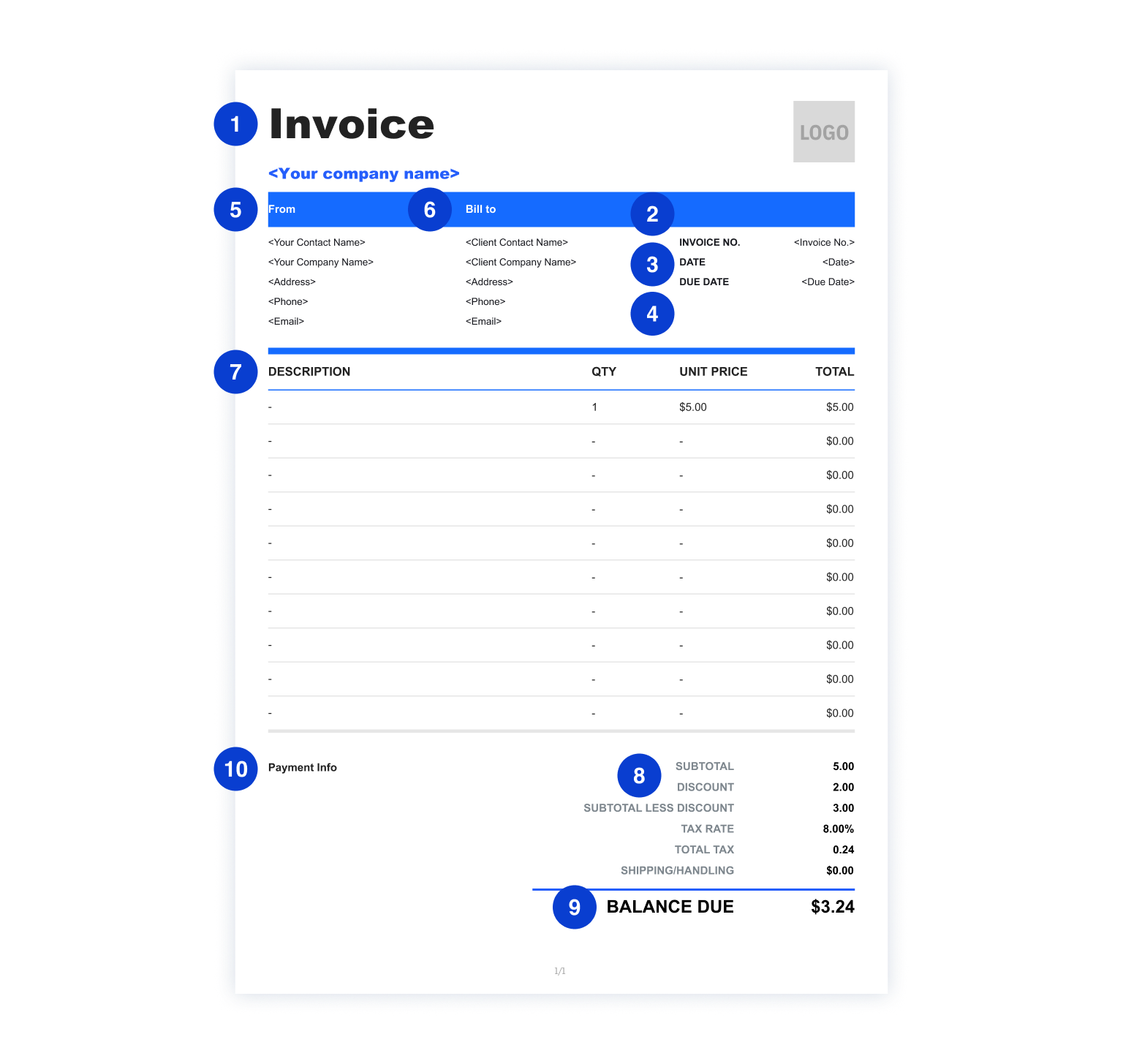
Clearly label the document as an “Invoice” so the recipient immediately understands its purpose.
A unique invoice number helps both you and your client track payments, references, and accounting records.
The issue date shows when the invoice was created and serves as a reference point for payment terms.
The due date clearly indicates when payment is expected, helping prevent late or forgotten payments.
Including your business name, address, and contact details makes the invoice legitimate and professional.
Listing your client’s name and contact information ensures the invoice is correctly assigned and processed.
Clear, itemized descriptions explain exactly what the client is being charged for and reduce disputes.
Breaking down costs shows transparency and helps clients understand how the final amount is calculated.
The total amount due highlights the exact payment required, making it easy for clients to act quickly.
Payment terms explain how and how soon the client should pay, such as accepted methods and late fee policies.
FAQ about Invoice Zip’s free invoice generator
An invoice is a formal document that records a transaction between a seller and a buyer. It outlines what products or services were provided, how much is owed, and how and when the payment should be made.
For small businesses, freelancers, and contractors, invoices are not just payment requests — they are essential tools for cash flow management, bookkeeping, and building professional credibility.
A clear, well-structured invoice helps:
- Get paid faster
- Avoid payment disputes
- Keep accurate financial records
- Present a professional brand image
Using an invoice generator instead of manual invoicing offers clear advantages for freelancers, contractors, and small businesses:
1. Saves Time
Create professional invoices in minutes instead of starting from scratch every time. An invoice generator eliminates repetitive formatting work and manual calculations, allowing you to focus more on serving clients and growing your business.
2. Reduces Errors
Automatic calculations prevent costly math mistakes and inconsistencies. By calculating subtotals, taxes, discounts, and totals for you, an invoice generator reduces the risk of incorrect charges that could delay payment or harm client trust.
3. Looks Professional
Clean layouts and consistent formatting improve your brand image. Well-designed invoices help your business appear reliable and established, even if you’re just getting started, making clients more confident in paying you on time.
Trust plays a major role in getting invoices paid on time. To build confidence with your clients:
- Use a clear and consistent format
- Include complete and accurate information
- Avoid vague service descriptions
- Clearly state payment terms and due dates
- Add your logo or brand colors for recognition
- Send invoices promptly after work is completed
A professional invoice signals reliability and reduces friction during payment.
Choosing the right invoicing tool depends on how often you invoice and how complex your billing needsare. The comparison below highlights the key differences:
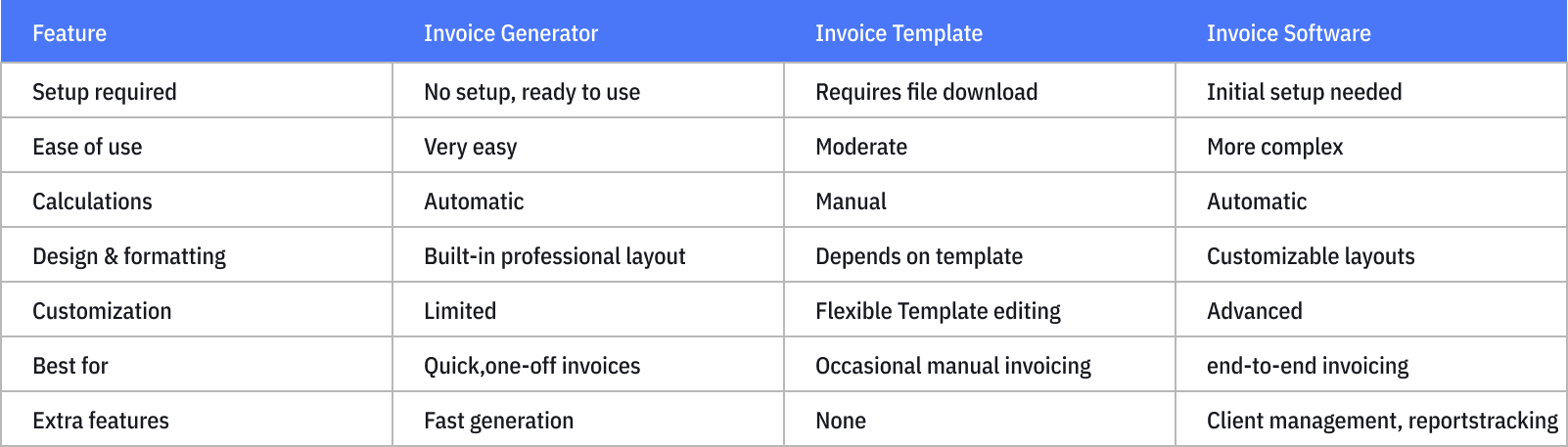
There is no single best way to create an invoice — the right choice depends on your business needs, workflow, and level of complexity. Invoice templates are a simple and flexible option for occasional invoicing, while invoice generators help you create professional invoices quickly without setup.
If you’re looking for the most efficient, consistent, and scalable invoicing process, we recommend using our invoice software. It allows you to manage invoices in one place, automate key steps, reduce manual work, and maintain a professional workflow as your business grows.
An invoice is a formal document that records a transaction between a seller and a buyer. It outlines what products or services were provided, how much is owed, and how and when the payment should be made.
An invoice is a formal document that records a transaction between a seller and a buyer. It outlines what products or services were provided, how much is owed, and how and when the payment should be made.
Get paid faster
- Avoid payment disputes
- Keep accurate financial records
- Present a professional brand image
Other Free Resources

Try Invoice Zip Today
Start Sending Invoices, Building Reports, Saving Office
Time and Get Paid Faster.